How I Fix Astro Sitemap in SSR Mode: Complete Guide for Cloudflare & Vercel
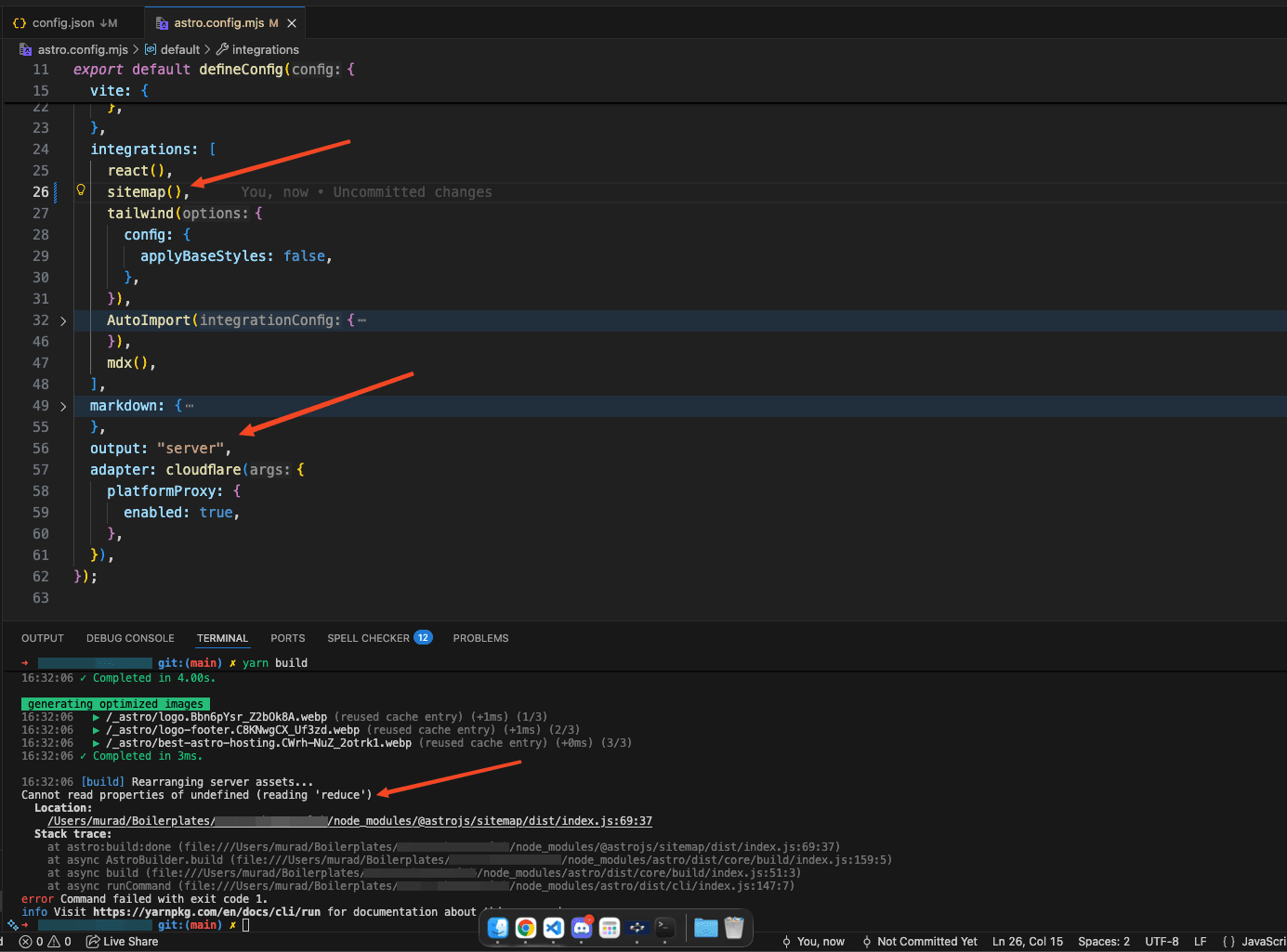
If you're building an Astro site with server-side rendering (SSR) using Cloudflare, Vercel, or any other adapter, you might have encountered a frustrating error when trying to generate sitemaps: Cannot read properties of undefined (reading 'reduce'). This happened to me while working on a Hugo themes directory (using Astro!), and here's how I solved it.
The Problem I Encountered
I was building a theme directory website using Astro with the following setup:
- Output mode:
server(SSR) - Adapter:
@astrojs/cloudflare(also works with@astrojs/vercel,@astrojs/netlify, etc.) - Sitemap:
@astrojs/sitemapintegration
Everything worked fine in development, but when I ran yarn build, the build failed with this cryptic error:
Cannot read properties of undefined (reading 'reduce')
Location: /node_modules/@astrojs/sitemap/dist/index.js:69:37
At first, I tried accessing /sitemap-index.xml, which gave me a router warning:
[WARN] [router] A `getStaticPaths()` route pattern was matched,
but no matching static path was found for requested path `/sitemap-index.xml`
No sitemap files were being generated at all.
Why This Happens
The issue boils down to a fundamental incompatibility:
The @astrojs/sitemap integration expects static routes at build time. When you use SSR mode with output: "server", your routes become dynamic. They're generated on-demand rather than at build time.
The sitemap integration can't discover your blog posts, themes, categories, or any other content from Astro collections because:
- SSR routes are generated dynamically
- The integration runs during build and expects all URLs upfront
- Content collections aren't exposed to the integration in SSR mode
This creates a catch-22 situation where your sitemap is either empty or the build fails entirely.
The Solution: Custom Sitemap Endpoint
After researching and testing different approaches, I found that the best solution is to bypass the official sitemap integration and create a custom API endpoint that generates the sitemap on-demand.
Here's how I implemented it:
Step 1: Remove the Sitemap Integration
First, I conditionally disabled the sitemap integration in astro.config.mjs:
import sitemap from "@astrojs/sitemap";

// Disable sitemap for SSR builds (incompatible with server output)
const enableSitemap = process.env.ENABLE_SITEMAP === "true";

export default defineConfig({
  site: "https://hugothemes.dev/",
  integrations: [
    react(),
    ...(enableSitemap ? [sitemap()] : []),
    tailwind(),
    mdx(),
  ],
  output: "server",
  // Works with any adapter: cloudflare(), vercel(), netlify(), node(), etc.
  adapter: cloudflare({
    platformProxy: {
      enabled: true,
    },
  }),
  // Or use: adapter: vercel(),
  // Or use: adapter: netlify(),
});
This way, the sitemap integration only runs if explicitly enabled, preventing build errors.
Step 2: Create Custom Sitemap Endpoints
I created a files in src/pages/:
src/pages/sitemap.xml.ts
import type { APIContext } from "astro";
import { getCollection } from "astro:content";
import config from "@/config/config.json";
import { slugify } from "@/lib/utils/textConverter";

export async function GET(context: APIContext) {
  const site = config.site.base_url.replace(/\/+$/, "");
  const useTrailingSlash = config.site.trailing_slash;

  const formatUrl = (path: string) => {
    const url = `${site}${path}`;
    return useTrailingSlash && !url.endsWith("/") ? `${url}/` : url;
  };

  // Get all collections
  const themes = await getCollection("themes", ({ data }) => !data.draft);
  const posts = await getCollection("blog", ({ data }) => !data.draft);
  const pages = await getCollection("pages", ({ data }) => !data.draft);
  const categories = await getCollection("category", ({ data }) => !data.draft);
  const cms = await getCollection("cms", ({ data }) => !data.draft);
  const css = await getCollection("css", ({ data }) => !data.draft);

  const urls: Array<{ loc: string; changefreq?: string; priority?: number }> =
    [];

  // Static pages
  urls.push(
    { loc: formatUrl("/"), changefreq: "daily", priority: 1.0 },
    { loc: formatUrl("/free-hugo-themes"), changefreq: "daily", priority: 0.9 },
    {
      loc: formatUrl("/premium-hugo-themes"),
      changefreq: "daily",
      priority: 0.9,
    },
    { loc: formatUrl("/blog"), changefreq: "weekly", priority: 0.8 },
  );

  // Theme pages
  themes.forEach((theme) => {
    urls.push({
      loc: formatUrl(`/themes/${theme.slug}`),
      changefreq: "weekly",
      priority: 0.8,
    });
  });

  // Blog posts
  posts.forEach((post) => {
    urls.push({
      loc: formatUrl(`/blog/${post.slug}`),
      changefreq: "monthly",
      priority: 0.7,
    });
  });

  // Category pages
  categories.forEach((category) => {
    const categorySlug = slugify(category.data.title);
    urls.push({
      loc: formatUrl(`/categories/${categorySlug}`),
      changefreq: "weekly",
      priority: 0.7,
    });
  });

  // Technology pages
  const technologies = [...cms, ...css];
  technologies.forEach((tech) => {
    const techSlug = slugify(tech.data.title);
    urls.push({
      loc: formatUrl(`/technologies/${techSlug}`),
      changefreq: "weekly",
      priority: 0.6,
    });
  });

  const sitemap = `<?xml version="1.0" encoding="UTF-8"?>
<urlset xmlns="http://www.sitemaps.org/schemas/sitemap/0.9">
${urls
  .map(
    (url) => `  <url>
    <loc>${url.loc}</loc>${
      url.changefreq
        ? `
    <changefreq>${url.changefreq}</changefreq>`
        : ""
    }${
      url.priority !== undefined
        ? `
    <priority>${url.priority}</priority>`
        : ""
    }
  </url>`,
  )
  .join("\n")}
</urlset>`;

  return new Response(sitemap, {
    status: 200,
    headers: {
      "Content-Type": "application/xml",
      "Cache-Control": "public, max-age=3600",
    },
  });
}
This endpoint:
- Reads configuration from my
config.jsonfile - Respects trailing slash settings
- Fetches all content collections (themes, blog posts, categories, etc.)
- Generates proper XML sitemap format
- Includes SEO metadata like changefreq and priority
- Caches the result for 1 hour to improve performance
Step 3: Test the Solution
After implementing this, I ran:
yarn buildThe build succeeded! I then deployed to Cloudflare and verified that /sitemap.xml was accessible and contained all my routes.
Key Benefits of This Approach
- Always Up-to-Date: The sitemap generates on each request, so new content appears immediately
- Works with SSR: No build-time limitations or conflicts
- Fully Customizable: Add any logic for including/excluding content
- Config-Driven: Respects your site's base URL and trailing slash settings
- SEO-Friendly: Includes proper changefreq and priority values
Caching Considerations
I set the cache to 1 hour (max-age=3600). For your use case, adjust based on content update frequency:
- Frequently updated sites: 15-30 minutes
- Rarely updated sites: 6-24 hours
- Real-time requirements: Remove caching entirely
For my themes directory, 1 hour is a good balance since new themes are added daily but not every minute.
What About sitemap-index.xml?
If you want a sitemap index file (useful for large sites with multiple sitemaps), create src/pages/sitemap-index.xml.ts:
import type { APIContext } from "astro";
import config from "@/config/config.json";

export async function GET(context: APIContext) {
  const site = config.site.base_url.replace(/\/+$/, "");
  const sitemapUrl = `${site}/sitemap.xml`;
  const now = new Date().toISOString();

  const sitemapIndex = `<?xml version="1.0" encoding="UTF-8"?>
<sitemapindex xmlns="http://www.sitemaps.org/schemas/sitemap/0.9">
  <sitemap>
    <loc>${sitemapUrl}</loc>
    <lastmod>${now}</lastmod>
  </sitemap>
</sitemapindex>`;

  return new Response(sitemapIndex, {
    status: 200,
    headers: {
      "Content-Type": "application/xml",
      "Cache-Control": "public, max-age=3600",
    },
  });
}
Don't Forget robots.txt
Update your public/robots.txt to point to the sitemap:
User-agent: *
Allow: /

Sitemap: https://yourdomain.com/sitemap.xml
Conclusion
The official @astrojs/sitemap integration is excellent for static sites, but SSR mode requires a different approach. By creating a custom sitemap endpoint, you get full control and ensure all your dynamic content is properly indexed by search engines.
This solution has been working perfectly on my Hugo themes directory. The sitemap updates instantly whenever I add new themes or blog posts, and search engines can discover all my content without issues.
If you're facing similar issues with Astro SSR and sitemaps, give this approach a try. It's more reliable than fighting with the official integration and gives you complete control over what appears in your sitemap.
Key Takeaways
- ✅ The
@astrojs/sitemapintegration doesn't work well with SSR mode - ✅ Custom API endpoints give you full control over sitemap generation
- ✅ Your sitemap can be dynamic and always up-to-date
- ✅ This approach works with any Astro adapter (Cloudflare, Vercel, Netlify, etc.)
- ✅ Remember to add proper caching headers for performance
Got questions or improvements? Feel free to reach out. Happy building! 🚀
Last updated: 02 Feb, 2026